“Installed it before boarding, landed in Botswana, and maps plus translation apps were usable within minutes. That alone made the arrival much less stressful.”
OFFICIAL CARRIER PARTNER · 5G NETWORK
Botswana eSIM
Stay connected in Botswana with high-speed, roaming-ready data, simple setup, and dependable coverage.
Instant Delivery
One-tap install link delivered to email in under 30 seconds.
Tier-1 Connectivity
National 4G LTE/5G coverage with local carriers.
Travel App Ready
Built for maps, messaging, payments, and daily travel needs.
Travel eSIM for Botswana
Buy a Botswana eSIM online from $15.99
Compare prepaid Botswana travel eSIM plans for tourists, business trips, and daily data use. Activate in minutes, skip physical SIM cards, and stay connected for maps, messaging, rides, and hotspot use where supported.
The plans below are current Botswana eSIM offers from MollySIM with instant delivery after payment and fast 4G/5G-ready data coverage depending on the network and device.
- Instant eSIM delivery by email
- No physical SIM card required
- Prepaid data for Botswana
- Quick setup before or after landing
40 prepaid eSIM plans for Botswana
40 prepaid data plans work in Botswana, priced $7.99–$654.99 and valid 1–365 days. Every plan is delivered as a QR code and installs in minutes — no shop visit, no physical SIM.
| Data | Validity | Price |
|---|---|---|
| 500MB/day | 1 day | $7.99 |
| 1GB/day | 1 day | $13.49 |
| 2GB/day | 1 day | $21.49 |
| 3GB/day | 1 day | $37.49 |
| 10GB/day | 1 day | $49.49 |
| 1GB/day | 7 days | $55.49 |
Choose a Botswana eSIM quickly
Showing all plans: local + regional
Loading plans...
Why Choose Us
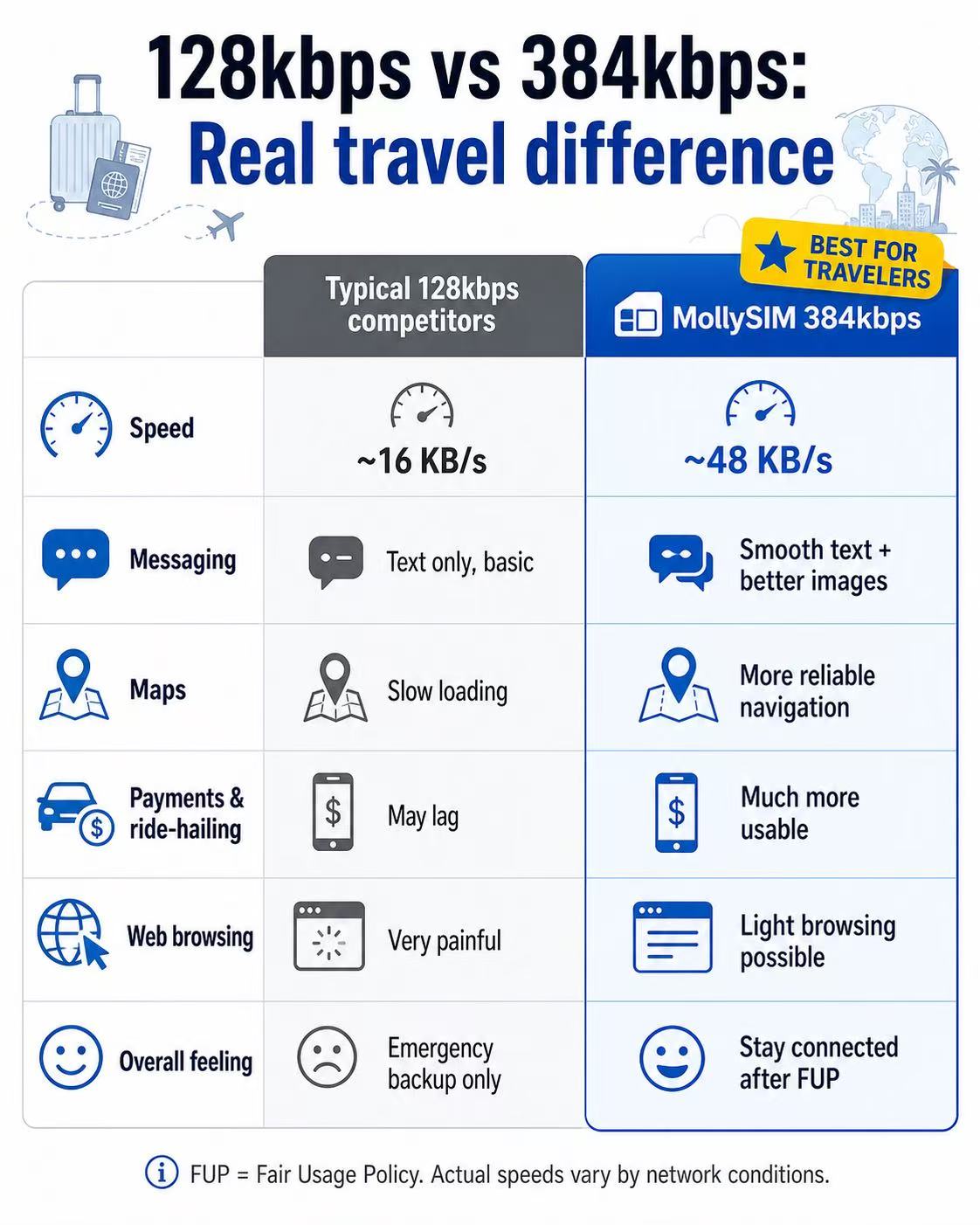
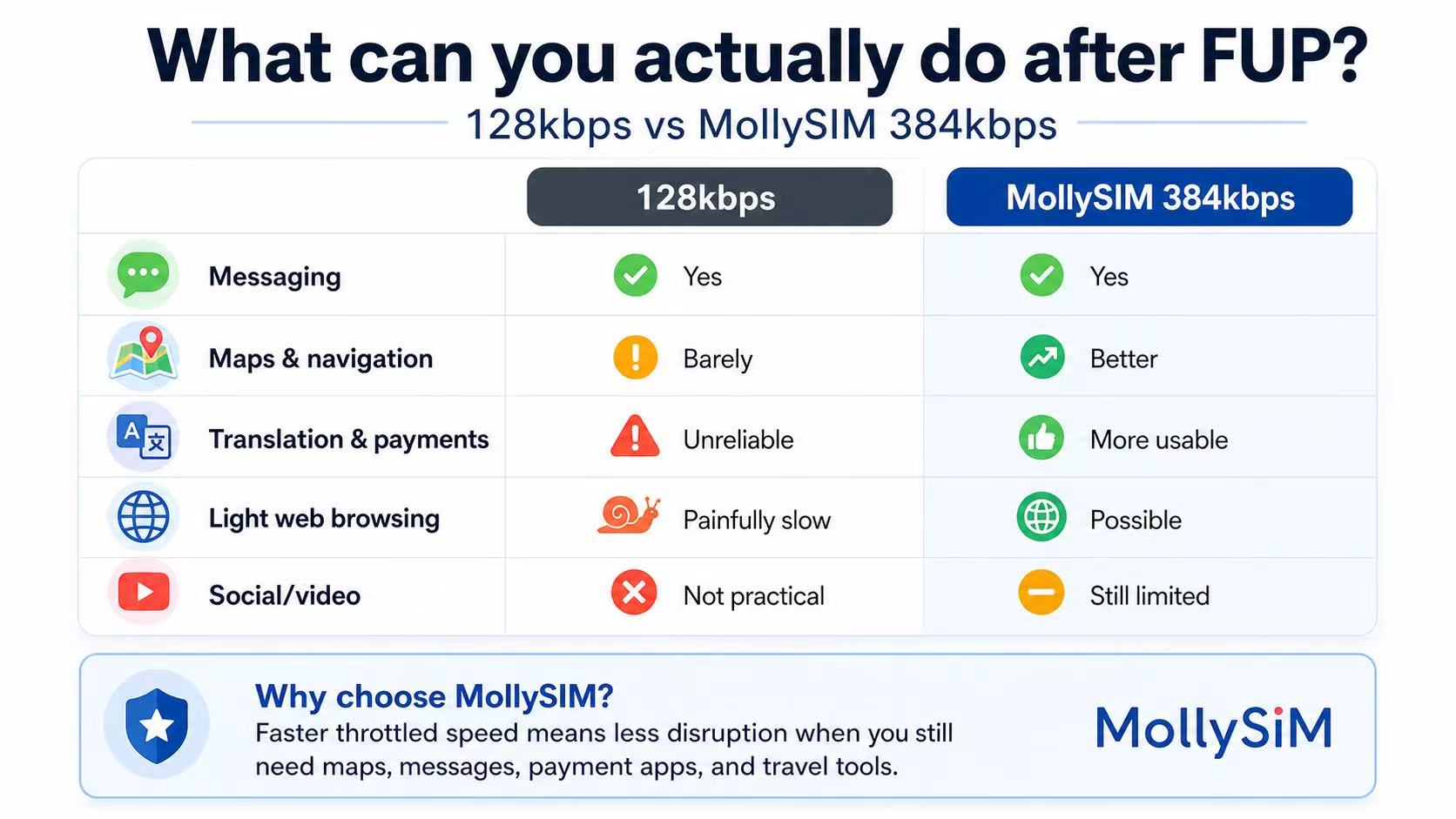
A more usable fallback after FUP.
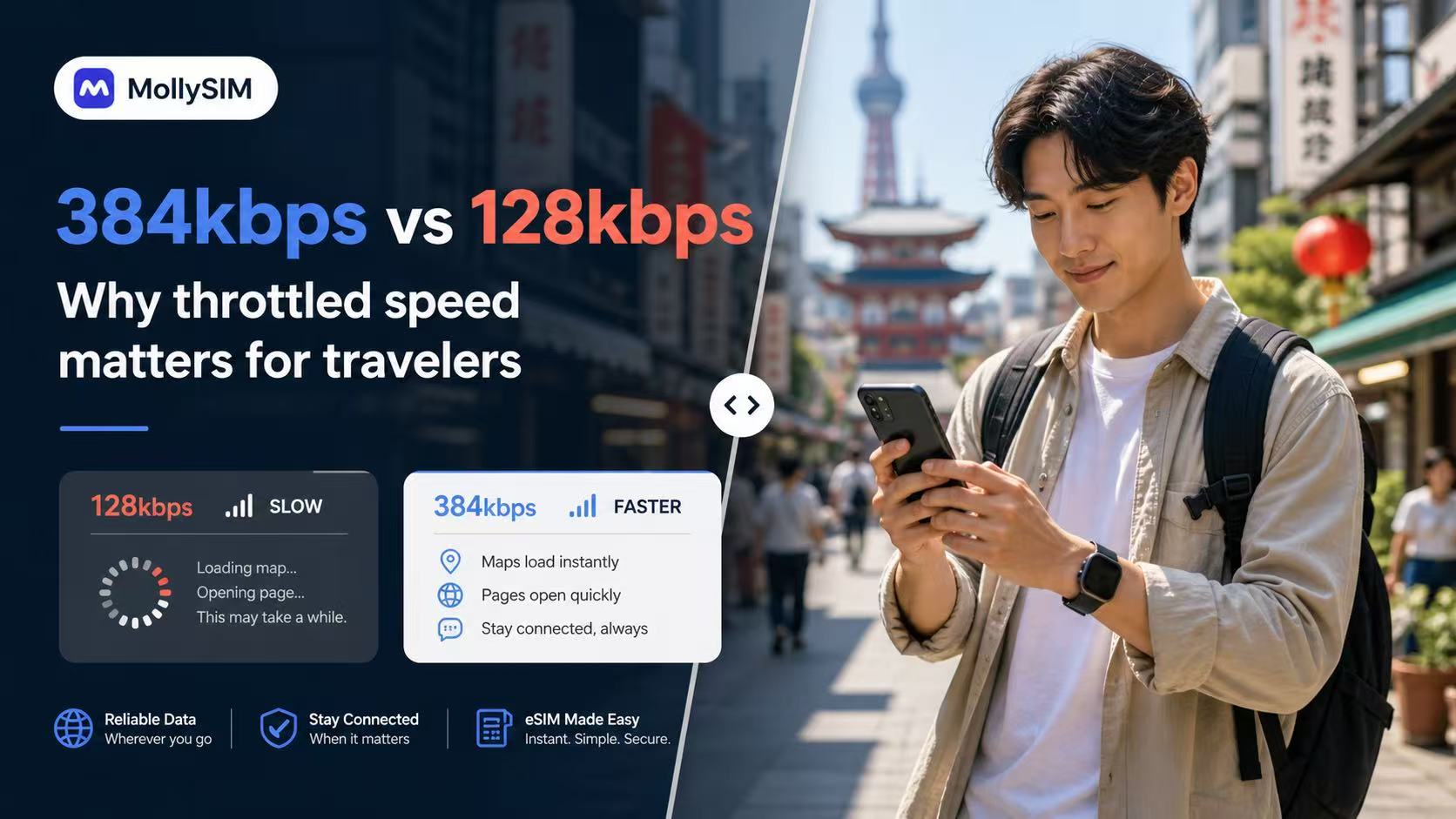
Many travel eSIMs slow to 128kbps after Fair Usage Policy limits. MollySIM Botswana plans throttle at 384kbps, 5Mbps, or 10Mbps instead, ensuring your key apps remain completely practical and responsive on the road.
384 Kbps
Emergency Backup
Basic Chat & Pay
Ideal for staying connected via essential messaging and utility apps after your main data limit.
💬 WeChat & WhatsApp
📍 Google Maps
📲 Google Translate
💳 Apple Pay & Alipay
5 Mbps
Smooth Social
Social Media & Music
Perfect for scrolling short videos, streaming HD music, and making digital travel queries.
📱 Instagram & TikTok
🎵 Spotify & Apple Music
📞 WhatsApp Audio & Video
🚗 Grab & Uber Maps
10 Mbps
Ultimate Power
Premium Streaming
Enjoy uninterrupted HD video streaming, low-latency online gaming, and large travel file uploads.
🎬 YouTube & Netflix HD
🎮 Real-time Mobile Gaming
💼 HD Zoom & Teams Calls
💻 Hotspot & Multi-devices
FUP = Fair Usage Policy. Actual throttled performance varies by network conditions, location, and device.
Testimonials
What travelers say after using MollySIM.
Real travel concerns tend to sound the same: activation speed, whether maps and payment apps work, and whether support responds quickly when something needs checking before departure.
“The activation email arrived fast, the install steps were clear, and hotspot worked on my laptop during travel across Botswana.”
“I mainly cared about translation, messaging, and getting directions. The fallback speed still felt more usable than the last travel SIM I bought.”
“I asked support about my phone compatibility before paying and got a clear answer quickly. Setup was easier than expected once the email arrived.”
Setup in 3 minutes.
The flow is intentionally simple: buy the plan, tap the install link from your order email, and land in Botswana already connected. Installation starts directly from the email on supported devices.
1
Buy your plan
Choose a best seller or customize by validity and data. Checkout is the same live MollySIM purchase flow used across the main storefront.
2
Tap to install
Open the order email on your iPhone or Android device and install in one tap. Most users finish setup before boarding, without hunting through settings.
3
Arrive online
Enable data roaming in your phone settings before you board. Turn on the eSIM when you land in Botswana and start using maps, messaging, and travel apps immediately.
Compatible Devices
Check eSIM support for iPhone, Android, and China-market models before checkout.
Apple iPhone
Supported on eSIM-capable iPhone models from XR through the latest Pro line. Mainland China domestic iPhones with dual physical SIM trays are typically not eSIM compatible.
Android
Works with many recent Samsung Galaxy, Fold, Flip, Pixel, and selected Motorola models that expose native eSIM installation inside system settings.
Not supported
Budget Android devices, carrier-locked phones, and some China-market variants may not expose eSIM support even if the model name looks similar to an international version.
Pro tip: dial *#06#. If your phone shows an EID number, it is generally ready for one-tap eSIM installation.
Support Center
Frequently Asked Questions
Will common travel and messaging apps work in Botswana with this eSIM?
This eSIM is designed for roaming-ready data in Botswana. App performance can vary by device, local network conditions, and service availability, so we recommend installing early and testing your setup on arrival.
Can I keep my home number while using this eSIM?
Yes. Use the eSIM for data and keep your primary SIM active for calls or SMS if your device and carrier support dual-SIM usage.
When does the validity period start?
The plan activates and the timer starts only when you connect to a supported network in Botswana. Installing it a few days before your trip will not waste any data days.
Does it support Hotspot / Tethering?
Yes. Personal hotspot is allowed on all plans. You can share your connection with your laptop or tablet without any additional charges.
What happens if I run out of data?
On Daily plans, your speed will be throttled to 384kbps once you hit the high-speed limit for the day. High speed resets every 24 hours. On Total plans, data will stop until a new plan is purchased.
Which carriers will I connect to?
MollySIM auto-switches to the best local networks, selecting the strongest 5G/LTE signal available in your current location.
My install link is not working. What should I do?
Make sure you are opening the install email on the phone you want to use, with a stable internet connection. If installation still fails, do not remove anything already added. Contact support for guided troubleshooting.
Can I move the eSIM to another phone after install?
Usually no. Once an eSIM profile is installed and registered to a device, it is generally locked to that device. Install it on the phone you plan to use in Botswana.
I paid but did not receive my eSIM — what should I do?
First, check your spam or junk folder for the confirmation email. Then log in to your account and go to My Orders — your QR code and eSIM details are available there even if the email was not delivered. If your order shows pending for more than 30 minutes, contact support with your order ID and payment confirmation.
Can I get a refund if my plan is unused?
Refund eligibility is assessed case by case under our Refund Policy. Unused plans that have not been activated may qualify if requested promptly. Once a plan is activated or its validity period has started, refunds are generally not available. Submit your request via the Refund Policy page with your order ID.
100% Refund Guarantee.
Travel plans changed? You can get a full refund on any unactivated eSIM within 6 months of purchase.
Still have questions?
Our global support team is available 24/7 to assist with your eSIM installation or plan choice.
Contact Support