“Installed it before boarding, landed in Shanghai, and maps plus Alipay were usable within minutes. That alone made the arrival much less stressful.”
พันธมิตรผู้ให้บริการอย่างเป็นทางการ · เครือข่าย 5G
China Mainland eSIM การเชื่อมต่อสำหรับการเดินทาง.
Stay connected across China with roaming-ready data, simple setup, and dependable coverage across all 31 provincial-level regions.
จัดส่งทันที
ลิงก์ติดตั้งด้วยการแตะครั้งเดียวส่งไปยังอีเมลภายใน 30 วินาที
5G Connectivity
Tier-1 coverage via China Mobile & Unicom.
พร้อมใช้งานกับแอปท่องเที่ยว
สร้างขึ้นสำหรับแผนที่, การส่งข้อความ, การชำระเงิน และความต้องการในการเดินทางประจำวัน
Choose a China eSIM quickly
กำลังโหลดแผน...
ข้อมูลจำเพาะของผลิตภัณฑ์
จุดเด่นและรายละเอียดของแพ็กเกจจะโหลดโดยอัตโนมัติหลังจากที่คุณเลือกแพ็กเกจ
รองรับฮอตสปอตส่วนตัว
ติดตั้งด้วยการแตะครั้งเดียวบนอุปกรณ์ที่รองรับ
24/7 support before and after checkout
Select a China plan above to load the live benefits list and product information here.
Why Choose Us
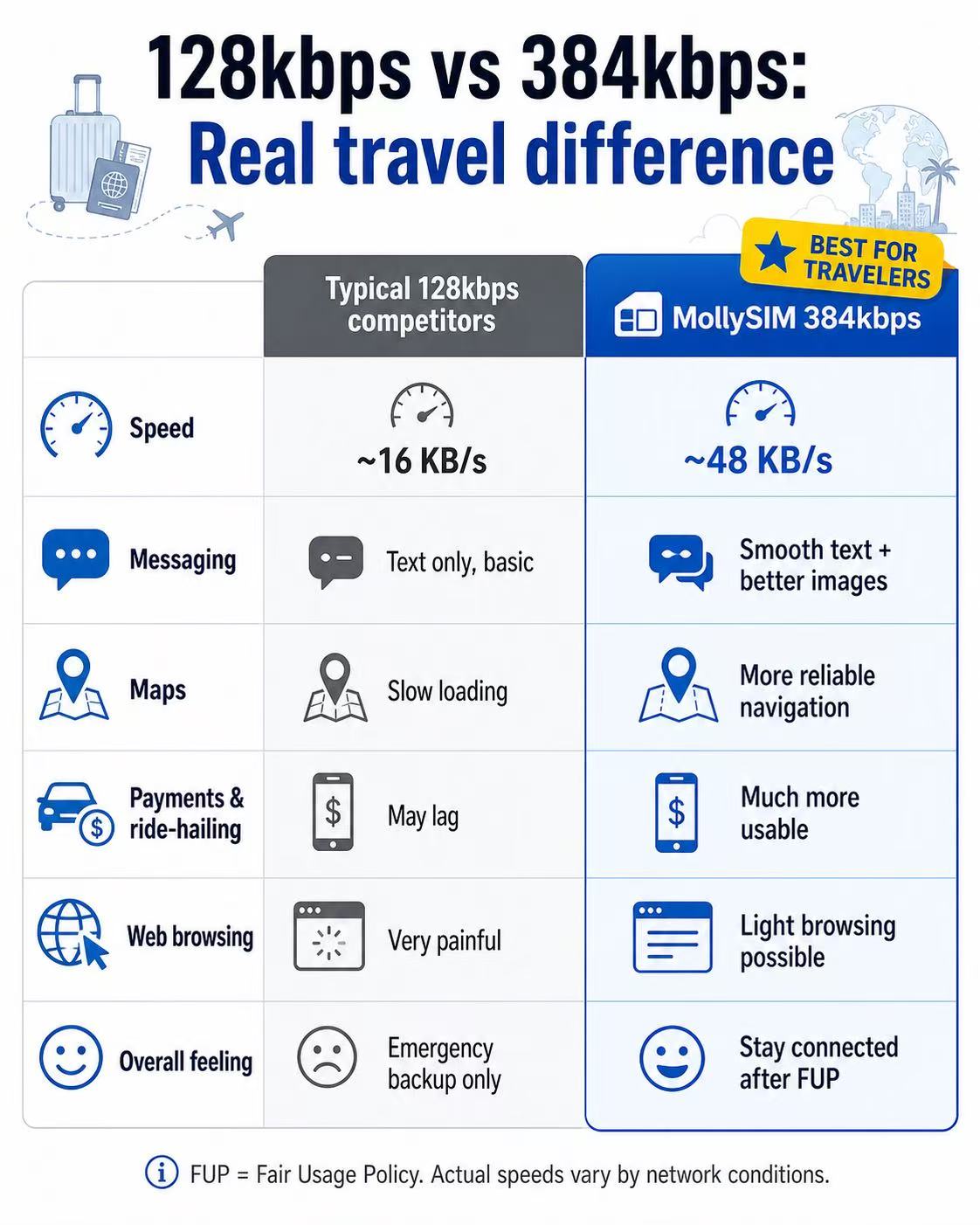
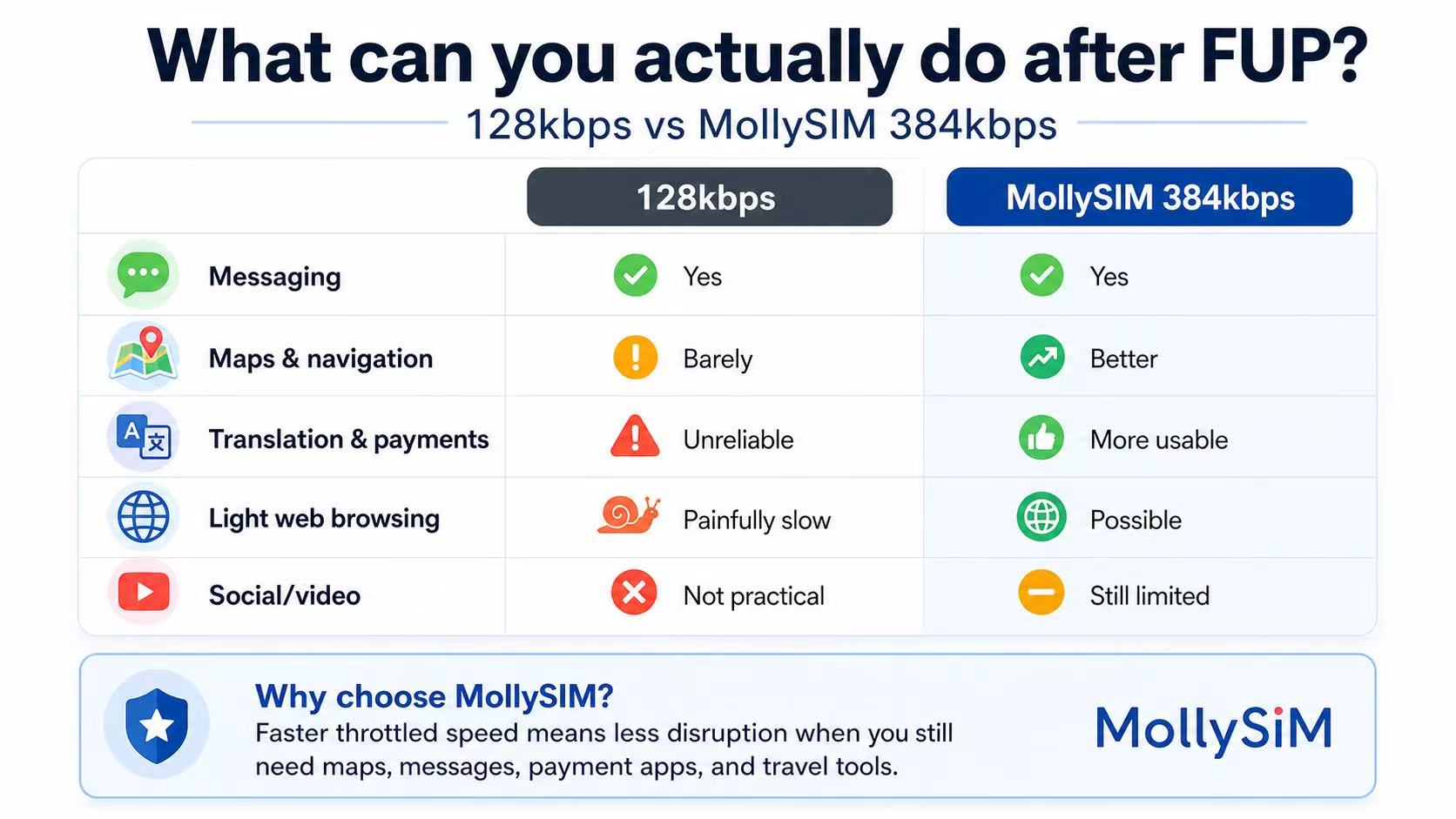
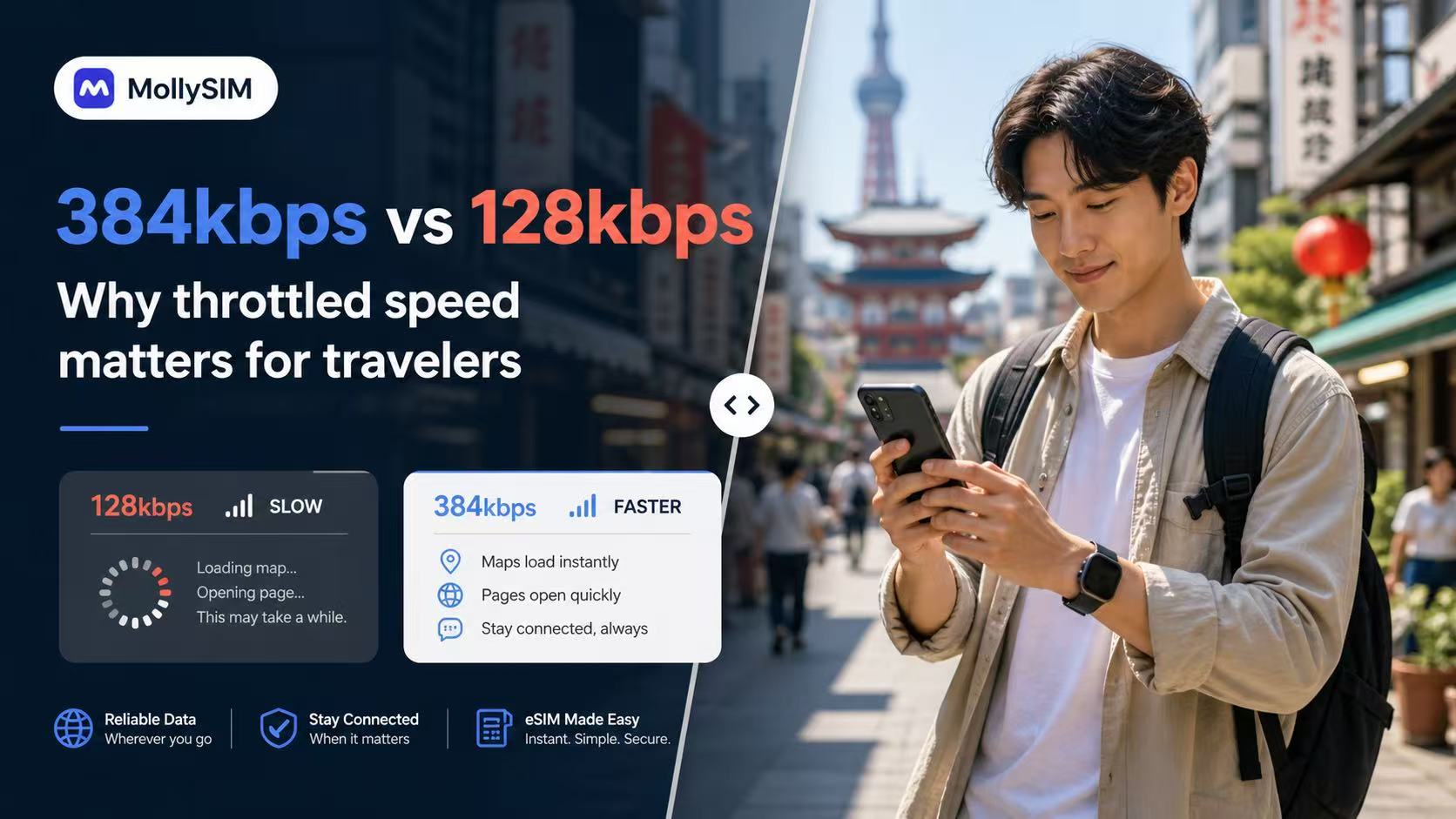
A more usable fallback after FUP.
Many travel eSIMs slow to 128kbps after Fair Usage Policy limits. MollySIM China plans throttle at 384kbps, 5Mbps, or 10Mbps instead, ensuring your key apps remain completely practical and responsive on the road.
384 Kbps
สำรองฉุกเฉิน
แชทและชำระเงินพื้นฐาน
เหมาะสำหรับการเชื่อมต่อผ่านแอปส่งข้อความและยูทิลิตี้ที่จำเป็นหลังจากข้อมูลหลักของคุณหมด
💬 WeChat & WhatsApp
📍 Google Maps
📲 Google Translate
💳 Apple Pay & Alipay
5 Mbps
โซเชียลที่ราบรื่น
โซเชียลมีเดียและเพลง
เหมาะสำหรับการเลื่อนดูวิดีโอสั้นๆ, สตรีมเพลง HD และสอบถามข้อมูลการเดินทางแบบดิจิทัล
📱 Instagram & TikTok
🎵 Spotify & Apple Music
📞 WhatsApp Audio & Video
🚗 Grab & Uber Maps
10 Mbps
พลังสูงสุด
การสตรีมแบบพรีเมียม
เพลิดเพลินกับการสตรีมวิดีโอ HD ที่ไม่สะดุด, การเล่นเกมออนไลน์ที่มีความหน่วงต่ำ, และการอัปโหลดไฟล์ท่องเที่ยวขนาดใหญ่
🎬 YouTube & Netflix HD
🎮 Real-time Mobile Gaming
💼 HD Zoom & Teams Calls
💻 Hotspot & Multi-devices
FUP = นโยบายการใช้งานที่เป็นธรรม ประสิทธิภาพที่ถูกจำกัดจริงจะแตกต่างกันไปตามสภาพเครือข่าย ตำแหน่ง และอุปกรณ์
คำรับรอง
What travelers say after using MollySIM in China.
ข้อกังวลในการเดินทางที่แท้จริงมักจะคล้ายกัน: ความเร็วในการเปิดใช้งาน, แอปแผนที่และแอปชำระเงินใช้งานได้หรือไม่, และฝ่ายสนับสนุนตอบกลับรวดเร็วหรือไม่เมื่อต้องการตรวจสอบบางอย่างก่อนออกเดินทาง
“The activation email arrived fast, the install steps were clear, and hotspot worked on my laptop during trains between Beijing and Xi’an.”
“I mainly cared about translation, messaging, and paying for food. The fallback speed still felt more usable than the last travel SIM I bought.”
“I asked support about my Samsung model before paying and got a clear answer quickly. Setup was easier than expected once the email arrived.”
ตั้งค่าใน 3 นาที
The flow is intentionally simple: buy the plan, tap the install link from your order email, and land in China already connected. Installation starts directly from the email on supported devices.
1
ซื้อแผนของคุณ
Choose a best seller or customize by validity and data. Checkout is the same live MollySIM purchase flow used across the main China storefront.
2
แตะเพื่อติดตั้ง
เปิดอีเมลคำสั่งซื้อบน iPhone หรืออุปกรณ์ Android ของคุณ และติดตั้งได้ในแตะเดียว ผู้ใช้ส่วนใหญ่ตั้งค่าเสร็จก่อนขึ้นเครื่อง โดยไม่ต้องค้นหาผ่านการตั้งค่า
3
มาถึงออนไลน์
Enable data roaming in your phone settings before you board. Turn on the eSIM when you land in China and start using maps, messaging, and travel apps immediately.
Compatible Devices
Check eSIM support for iPhone, Android, and China-market models before checkout.
Apple iPhone
รองรับบน iPhone รุ่นที่รองรับ eSIM ตั้งแต่ XR ไปจนถึงรุ่น Pro ล่าสุด iPhone ที่จำหน่ายในจีนแผ่นดินใหญ่ที่มีถาดใส่ซิมจริงสองช่องมักจะไม่รองรับ eSIM
Android
Works with many recent Samsung Galaxy, Fold, Flip, Pixel, and selected Motorola models that expose native eSIM installation inside system settings.
Not supported
Budget Android devices, carrier-locked phones, and some China-market variants may not expose eSIM support even if the model name looks similar to an international version.
เคล็ดลับ: กด *#06#. If your phone shows an EID number, it is generally ready for one-tap eSIM installation.
Support Center
คำถามที่พบบ่อย
Will common travel and messaging apps work in China with this eSIM?
This eSIM is designed for roaming-ready data in China. App performance can vary by device, local network conditions, and service availability, so we recommend installing early and testing your setup on arrival.
Can I keep my home number while using this eSIM?
Yes. Use the eSIM for data and keep your primary SIM active for calls or SMS if your device and carrier support dual-SIM usage.
When does the validity period start?
The plan activates and the timer starts only when you connect to a supported network in China. Installing it a few days before your trip will not waste any data days.
Does it support Hotspot / Tethering?
ใช่ อนุญาตให้ใช้ฮอตสปอตส่วนตัวได้ในทุกแพ็กเกจ คุณสามารถแชร์การเชื่อมต่อกับแล็ปท็อปหรือแท็บเล็ตของคุณได้โดยไม่มีค่าใช้จ่ายเพิ่มเติม
จะเกิดอะไรขึ้นหากใช้อินเทอร์เน็ตจนหมด?
สำหรับแผนรายวัน ความเร็วของคุณจะถูกจำกัดที่ 384kbps เมื่อคุณใช้ถึงขีดจำกัดความเร็วสูงสำหรับวันนั้น ความเร็วสูงจะรีเซ็ตทุก 24 ชั่วโมง สำหรับแผนรวม ข้อมูลจะหยุดทำงานจนกว่าจะมีการซื้อแผนใหม่
Which carriers will I connect to?
MollySIM auto-switches between China Mobile and China Unicom, selecting the strongest 5G/LTE signal available in your current location.
ลิงก์ติดตั้งของฉันไม่ทำงาน ฉันควรทำอย่างไร
ตรวจสอบให้แน่ใจว่าคุณกำลังเปิดอีเมลติดตั้งบนโทรศัพท์ที่คุณต้องการใช้ โดยมีการเชื่อมต่ออินเทอร์เน็ตที่เสถียร หากการติดตั้งยังคงล้มเหลว อย่าลบสิ่งใดๆ ที่เพิ่มไปแล้ว ติดต่อฝ่ายสนับสนุนเพื่อขอความช่วยเหลือในการแก้ไขปัญหา
Can I move the eSIM to another phone after install?
Usually no. Once an eSIM profile is installed and registered to a device, it is generally locked to that device. Install it on the phone you plan to use in China.
ชำระเงินแล้วแต่ไม่ได้รับ eSIM ควรทำอย่างไร?
First, check your spam or junk folder for the confirmation email. Then log in to your account and go to My Orders — your QR code and eSIM details are available there even if the email was not delivered. If your order shows pending for more than 30 minutes, contact support with your order ID and payment confirmation.
สามารถขอคืนเงินได้หรือไม่หากยังไม่ได้ใช้งานแพ็กเกจ?
การพิจารณาการคืนเงินจะประเมินเป็นรายกรณีภายใต้นโยบายการคืนเงินของเรา แผนที่ยังไม่ได้ใช้งานและยังไม่ได้เปิดใช้งานอาจมีสิทธิ์ได้รับการคืนเงินหากร้องขอทันที เมื่อแผนถูกเปิดใช้งานหรือระยะเวลาความถูกต้องได้เริ่มต้นขึ้น โดยทั่วไปแล้วจะไม่มีการคืนเงิน ส่งคำขอของคุณผ่านหน้า นโยบายการคืนเงิน พร้อมรหัสคำสั่งซื้อของคุณ

100% Refund Guarantee.
แผนการเดินทางเปลี่ยนไปใช่ไหม? คุณสามารถรับเงินคืนเต็มจำนวนสำหรับ eSIM ที่ยังไม่ได้เปิดใช้งานภายใน 6 เดือนนับจากวันที่ซื้อ
ยังมีคำถามอยู่ใช่ไหม?
ทีมสนับสนุนทั่วโลกของเราพร้อมให้บริการตลอด 24 ชั่วโมงทุกวัน เพื่อช่วยเหลือในการติดตั้ง eSIM หรือการเลือกแผนของคุณ
ติดต่อฝ่ายสนับสนุน