“Installed it before boarding, landed in Shanghai, and maps plus Alipay were usable within minutes. That alone made the arrival much less stressful.”
MITRA OPERATOR RESMI · JARINGAN 5G
China Mainland eSIM Konektivitas Perjalanan.
Stay connected across China with roaming-ready data, simple setup, and dependable coverage across all 31 provincial-level regions.
Pengiriman Instan
Tautan instalasi sekali ketuk dikirim ke email dalam waktu kurang dari 30 detik.
5G Connectivity
Tier-1 coverage via China Mobile & Unicom.
Siap Aplikasi Perjalanan
Dibuat untuk peta, pesan, pembayaran, dan kebutuhan perjalanan sehari-hari.
Choose a China eSIM quickly
Memuat paket...
Spesifikasi Produk
Sorotan dan detail paket akan dimuat secara otomatis setelah Anda memilih paket.
Hotspot pribadi didukung
Instalasi sekali ketuk pada perangkat yang didukung
24/7 support before and after checkout
Select a China plan above to load the live benefits list and product information here.
Why Choose Us
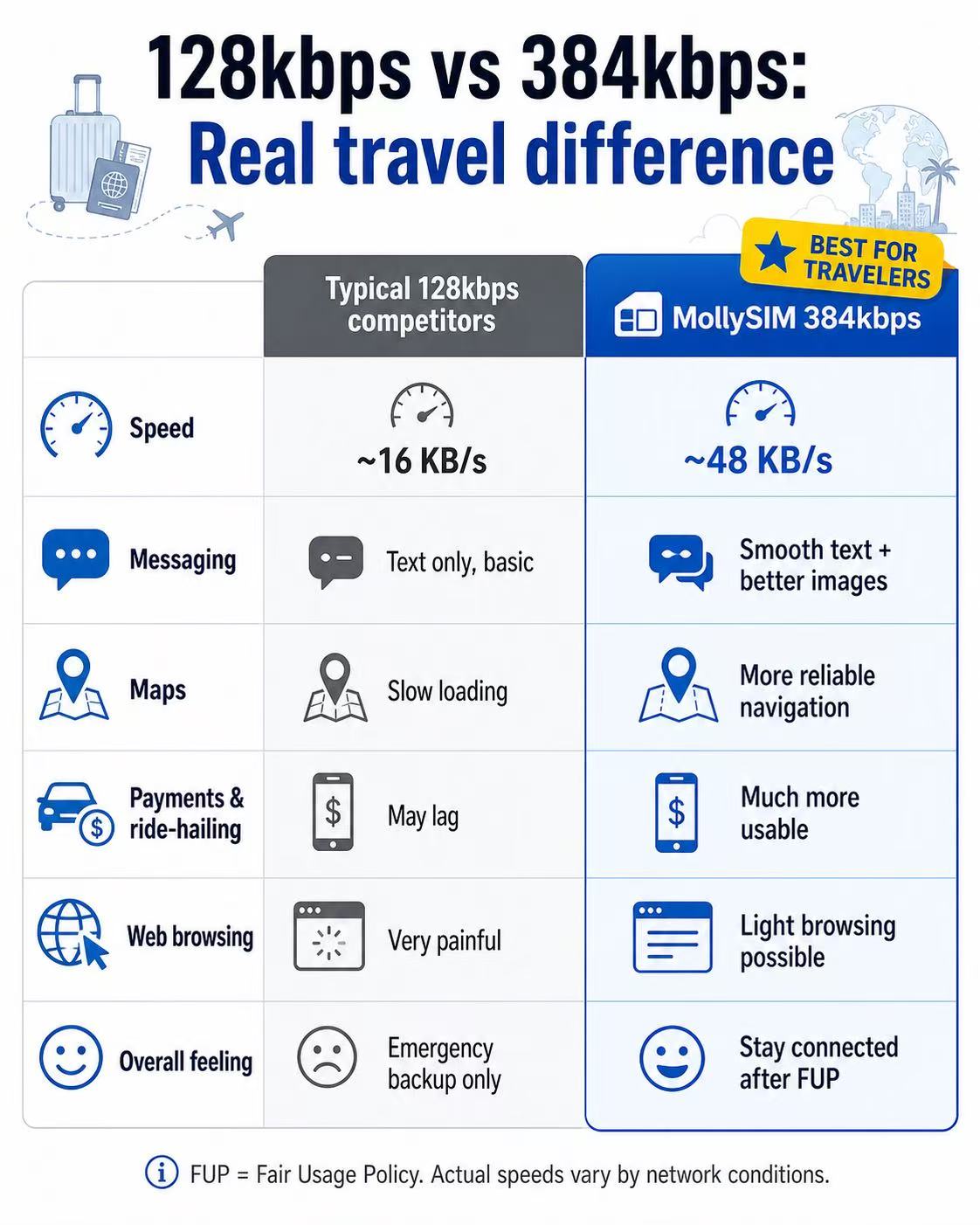
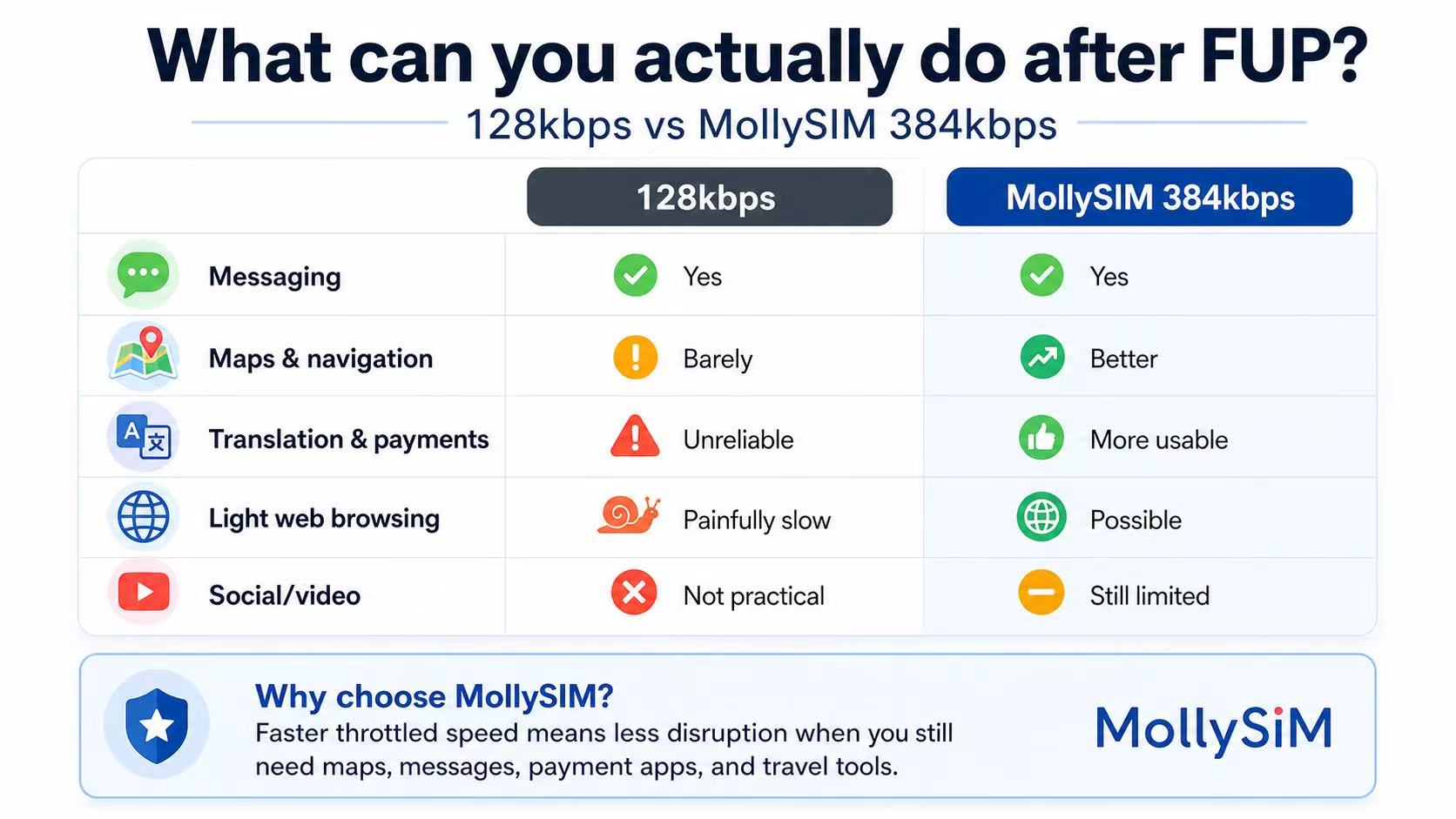
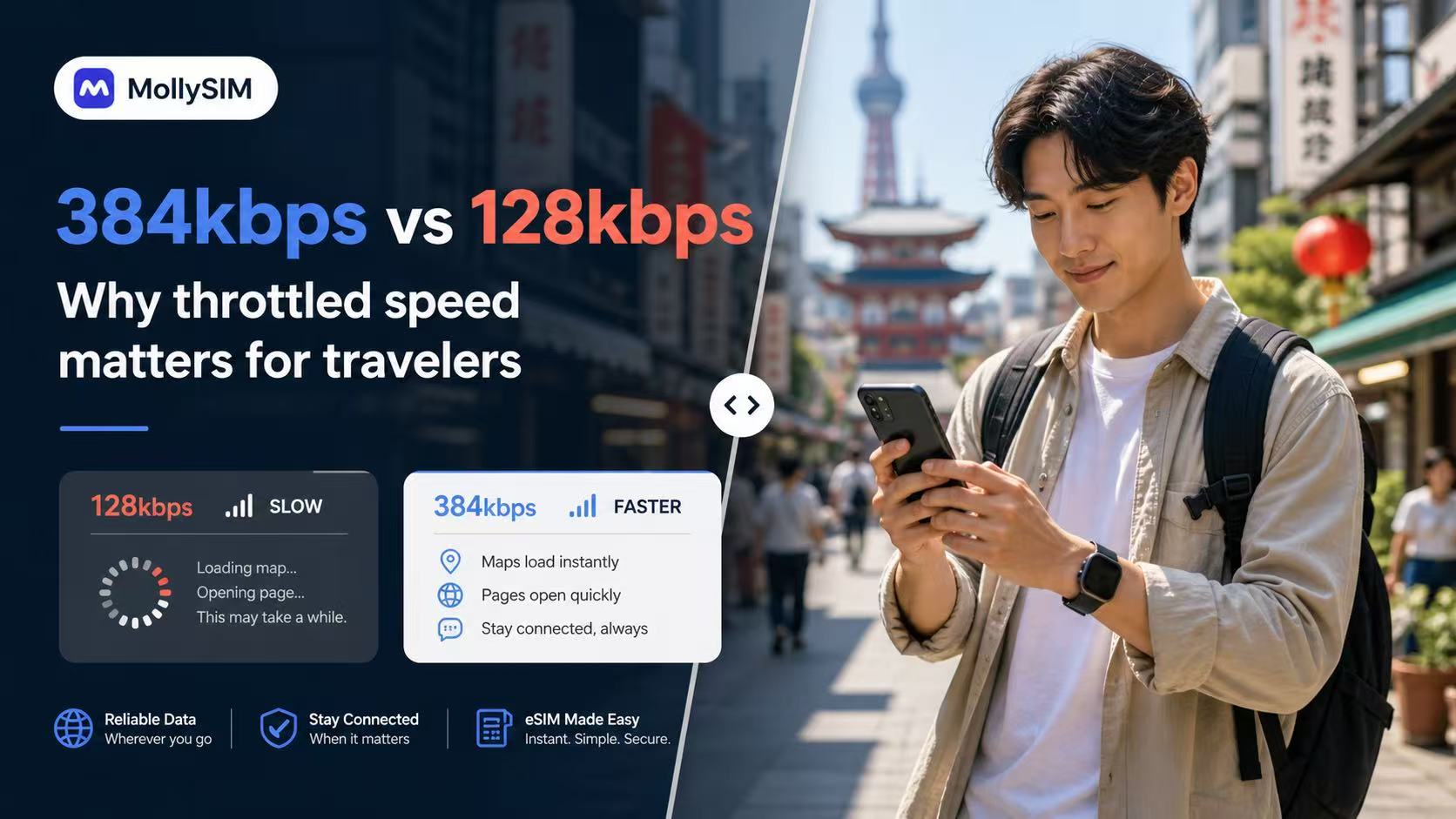
Cadangan yang lebih dapat digunakan setelah FUP.
Many travel eSIMs slow to 128kbps after Fair Usage Policy limits. MollySIM China plans throttle at 384kbps, 5Mbps, or 10Mbps instead, ensuring your key apps remain completely practical and responsive on the road.
384 Kbps
Cadangan Darurat
Obrolan & Pembayaran Dasar
Ideal untuk tetap terhubung melalui aplikasi pesan dan utilitas penting setelah batas data utama Anda habis.
💬 WeChat & WhatsApp
📍 Google Maps
📲 Google Translate
💳 Apple Pay & Alipay
5 Mbps
Sosial yang Lancar
Media Sosial & Musik
Sempurna untuk menggulir video pendek, streaming musik HD, dan membuat pertanyaan perjalanan digital.
📱 Instagram & TikTok
🎵 Spotify & Apple Music
📞 WhatsApp Audio & Video
🚗 Grab & Uber Maps
10 Mbps
Kekuatan Utama
Streaming Premium
Nikmati streaming video HD tanpa gangguan, bermain game online dengan latensi rendah, dan unggahan file perjalanan besar.
🎬 YouTube & Netflix HD
🎮 Real-time Mobile Gaming
💼 HD Zoom & Teams Calls
💻 Hotspot & Multi-devices
FUP = Kebijakan Penggunaan Wajar. Kinerja yang dibatasi sebenarnya bervariasi tergantung kondisi jaringan, lokasi, dan perangkat.
Testimoni
What travelers say after using MollySIM in China.
Kekhawatiran perjalanan yang sebenarnya cenderung sama: kecepatan aktivasi, apakah aplikasi peta dan pembayaran berfungsi, dan apakah dukungan merespons dengan cepat saat ada sesuatu yang perlu diperiksa sebelum keberangkatan.
“The activation email arrived fast, the install steps were clear, and hotspot worked on my laptop during trains between Beijing and Xi’an.”
“I mainly cared about translation, messaging, and paying for food. The fallback speed still felt more usable than the last travel SIM I bought.”
“I asked support about my Samsung model before paying and got a clear answer quickly. Setup was easier than expected once the email arrived.”
Pengaturan dalam 3 menit.
The flow is intentionally simple: buy the plan, tap the install link from your order email, and land in China already connected. Installation starts directly from the email on supported devices.
1
Beli paket Anda
Choose a best seller or customize by validity and data. Checkout is the same live MollySIM purchase flow used across the main China storefront.
2
Ketuk untuk menginstal
Buka email pesanan di perangkat iPhone atau Android Anda dan instal dalam satu ketukan. Sebagian besar pengguna menyelesaikan pengaturan sebelum naik pesawat, tanpa mencari-cari di pengaturan.
3
Tiba daring
Enable data roaming in your phone settings before you board. Turn on the eSIM when you land in China and start using maps, messaging, and travel apps immediately.
Perangkat yang Kompatibel
Periksa dukungan eSIM untuk model iPhone, Android, dan pasar Tiongkok sebelum pembayaran.
Apple iPhone
Didukung pada model iPhone yang mendukung eSIM mulai dari XR hingga lini Pro terbaru. iPhone domestik Tiongkok Daratan dengan dua slot SIM fisik biasanya tidak kompatibel dengan eSIM.
Android
Works with many recent Samsung Galaxy, Fold, Flip, Pixel, and selected Motorola models that expose native eSIM installation inside system settings.
Not supported
Perangkat Android murah, ponsel terkunci operator, dan beberapa varian pasar Tiongkok mungkin tidak menampilkan dukungan eSIM meskipun nama modelnya terlihat mirip dengan versi internasional.
Tips pro: hubungi *#06#. Jika ponsel Anda menampilkan nomor EID, umumnya sudah siap untuk instalasi eSIM sekali ketuk.
Support Center
Pertanyaan yang Sering Diajukan
Will common travel and messaging apps work in China with this eSIM?
This eSIM is designed for roaming-ready data in China. App performance can vary by device, local network conditions, and service availability, so we recommend installing early and testing your setup on arrival.
Bisakah saya tetap menggunakan nomor rumah saya saat memakai eSIM ini?
Yes. Use the eSIM for data and keep your primary SIM active for calls or SMS if your device and carrier support dual-SIM usage.
When does the validity period start?
The plan activates and the timer starts only when you connect to a supported network in China. Installing it a few days before your trip will not waste any data days.
Apakah ini mendukung Hotspot / Tethering?
Yes. Personal hotspot is allowed on all plans. You can share your connection with your laptop or tablet without any additional charges.
Apa yang terjadi jika kuota data saya habis?
Pada paket Harian, kecepatan Anda akan dibatasi hingga 384kbps setelah Anda mencapai batas kecepatan tinggi untuk hari itu. Kecepatan tinggi diatur ulang setiap 24 jam. Pada paket Total, data akan berhenti hingga paket baru dibeli.
Which carriers will I connect to?
MollySIM auto-switches between China Mobile and China Unicom, selecting the strongest 5G/LTE signal available in your current location.
Tautan instalasi saya tidak berfungsi. Apa yang harus saya lakukan?
Pastikan Anda membuka email instalasi di ponsel yang ingin Anda gunakan, dengan koneksi internet yang stabil. Jika instalasi masih gagal, jangan hapus apa pun yang sudah ditambahkan. Hubungi dukungan untuk pemecahan masalah terpandu.
Bisakah saya memindahkan eSIM ke ponsel lain setelah instalasi?
Usually no. Once an eSIM profile is installed and registered to a device, it is generally locked to that device. Install it on the phone you plan to use in China.
Saya sudah membayar tetapi belum menerima eSIM — apa yang harus saya lakukan?
Pertama, periksa folder spam atau junk Anda untuk email konfirmasi. Kemudian masuk ke akun Anda dan buka Pesanan Saya — kode QR dan detail eSIM Anda tersedia di sana meskipun email tidak terkirim. Jika pesanan Anda berstatus tertunda selama lebih dari 30 menit, hubungi dukungan dengan ID pesanan dan konfirmasi pembayaran Anda.
Bisakah saya mendapatkan pengembalian dana jika paket saya belum digunakan?
Kelayakan pengembalian dana dinilai berdasarkan kasus per kasus di bawah Kebijakan Pengembalian Dana kami. Paket yang tidak terpakai dan belum diaktifkan mungkin memenuhi syarat jika diminta segera. Setelah paket diaktifkan atau masa berlakunya dimulai, pengembalian dana umumnya tidak tersedia. Kirimkan permintaan Anda melalui halaman Kebijakan Pengembalian Dana dengan ID pesanan Anda.

Jaminan Pengembalian Dana 100%.
Rencana perjalanan berubah? Anda bisa mendapatkan pengembalian dana penuh untuk eSIM yang belum diaktifkan dalam waktu 6 bulan setelah pembelian.
Masih ada pertanyaan?
Tim dukungan global kami tersedia 24/7 untuk membantu instalasi eSIM atau pilihan paket Anda.
Hubungi Dukungan