“Installed it before boarding, landed in Shanghai, and maps plus Alipay were usable within minutes. That alone made the arrival much less stressful.”
شريك رسمي لشركة الاتصالات · شبكة 5G
China Mainland eSIM اتصال السفر.
Stay connected across China with roaming-ready data, simple setup, and dependable coverage across all 31 provincial-level regions.
توصيل فوري
رابط تثبيت بنقرة واحدة يتم تسليمه إلى البريد الإلكتروني في أقل من 30 ثانية.
5G Connectivity
Tier-1 coverage via China Mobile & Unicom.
تطبيق سفر جاهز
Built for maps, messaging, payments, and daily travel needs.
Choose a China eSIM quickly
جاري تحميل الخطط...
مواصفات المنتج
يتم تحميل أبرز تفاصيل الخطة وتفاصيلها تلقائيًا بعد اختيار خطة.
نقطة اتصال شخصية مدعومة
تثبيت بنقرة واحدة على الأجهزة المدعومة
24/7 support before and after checkout
Select a China plan above to load the live benefits list and product information here.
لماذا تختارنا
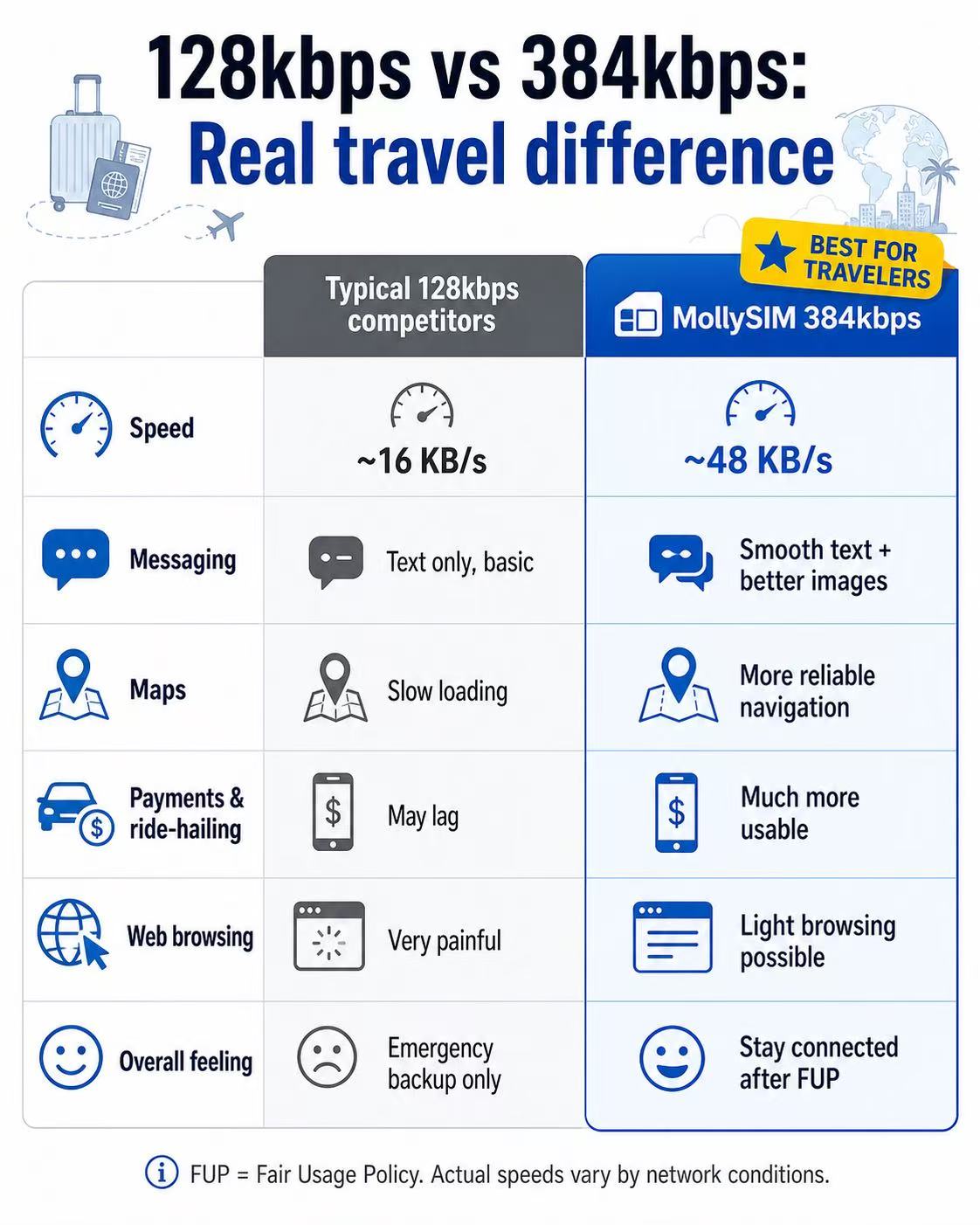
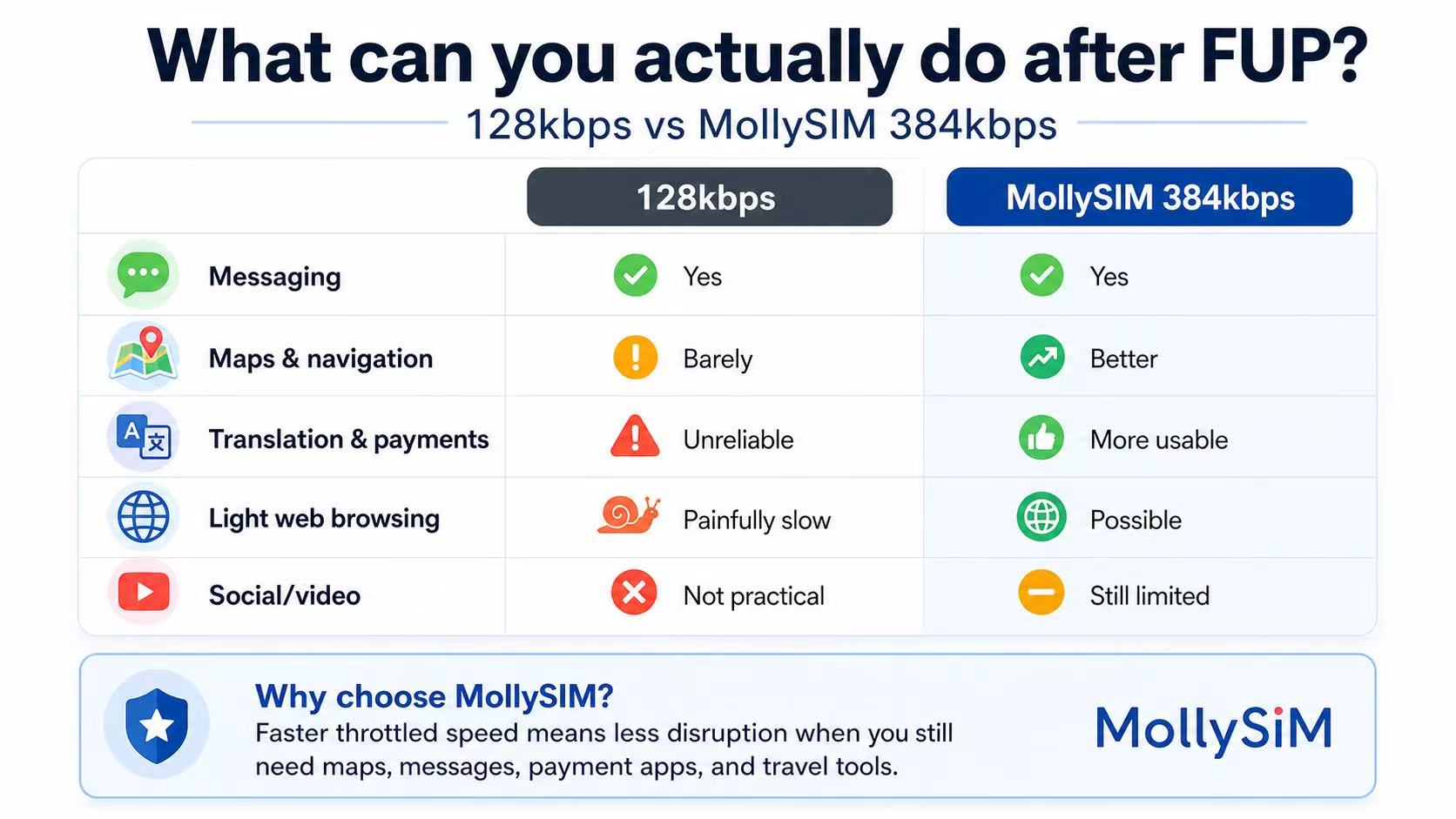
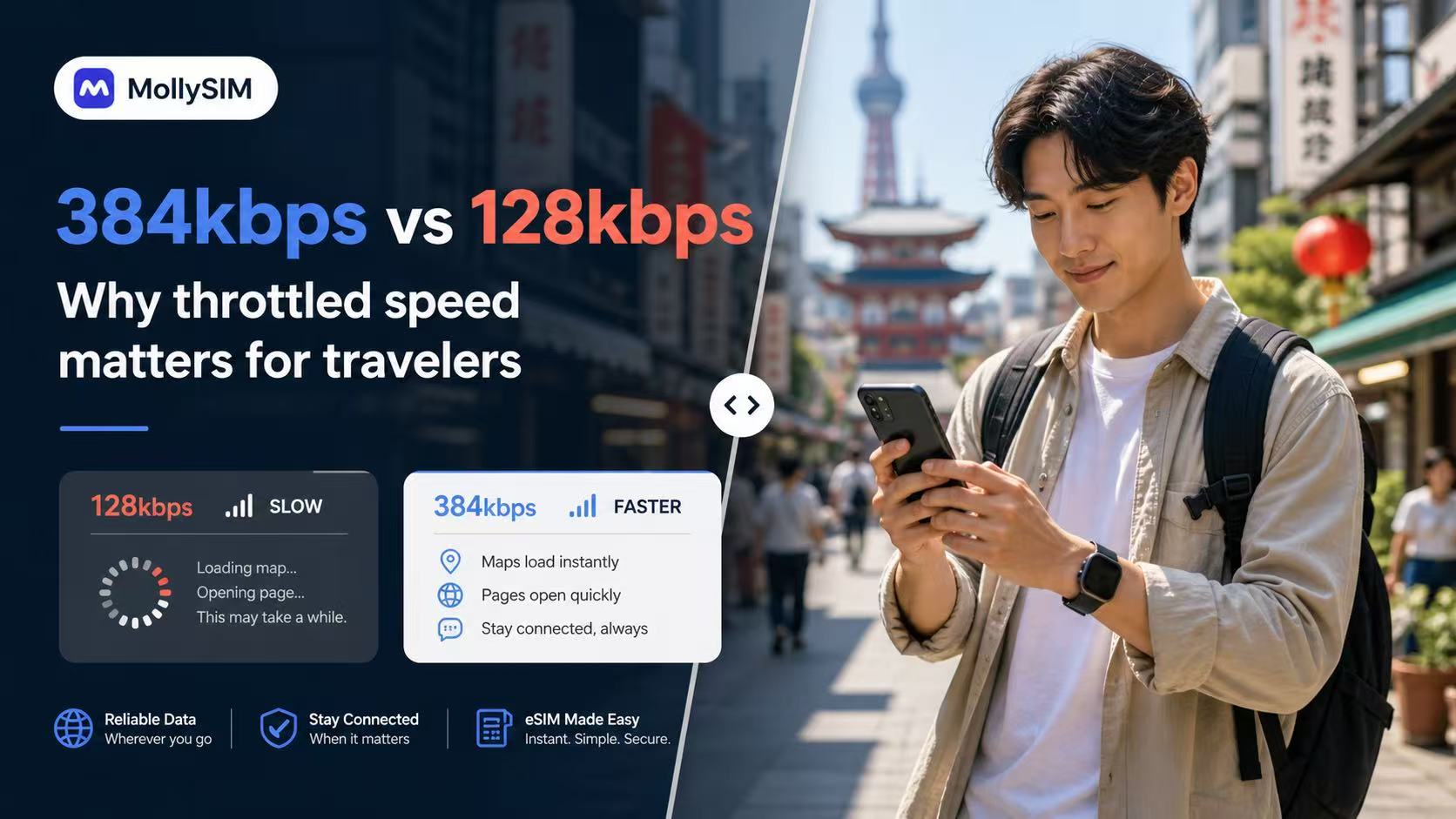
A more usable fallback after FUP.
Many travel eSIMs slow to 128kbps after Fair Usage Policy limits. MollySIM China plans throttle at 384kbps, 5Mbps, or 10Mbps instead, ensuring your key apps remain completely practical and responsive on the road.
384 Kbps
نسخ احتياطي للطوارئ
الدردشة والدفع الأساسي
مثالي للبقاء على اتصال عبر تطبيقات الرسائل والأدوات الأساسية بعد انتهاء حد البيانات الرئيسي.
💬 WeChat & WhatsApp
📍 Google Maps
📲 Google Translate
💳 Apple Pay & Alipay
5 Mbps
تواصل اجتماعي سلس
وسائل التواصل والموسيقى
مثالي لتصفح مقاطع الفيديو القصيرة، وبث الموسيقى عالية الدقة، وإجراء استفسارات السفر الرقمية.
📱 Instagram & TikTok
🎵 Spotify & Apple Music
📞 WhatsApp Audio & Video
🚗 Grab & Uber Maps
10 Mbps
الأداء الأقصى
البث المتميز
استمتع ببث فيديو عالي الدقة دون انقطاع، وألعاب عبر الإنترنت بزمن انتقال منخفض، وتحميل ملفات السفر الكبيرة.
🎬 YouTube & Netflix HD
🎮 Real-time Mobile Gaming
💼 HD Zoom & Teams Calls
💻 Hotspot & Multi-devices
FUP = سياسة الاستخدام العادل. يختلف الأداء الفعلي المخنق بناءً على ظروف الشبكة والموقع والجهاز.
شهادات العملاء
What travelers say after using MollySIM in China.
مخاوف السفر الحقيقية غالبًا ما تتشابه: سرعة التفعيل، ما إذا كانت تطبيقات الخرائط والدفع تعمل، وما إذا كان الدعم يستجيب بسرعة عندما يحتاج شيء ما إلى التحقق قبل المغادرة.
“The activation email arrived fast, the install steps were clear, and hotspot worked on my laptop during trains between Beijing and Xi’an.”
“I mainly cared about translation, messaging, and paying for food. The fallback speed still felt more usable than the last travel SIM I bought.”
“I asked support about my Samsung model before paying and got a clear answer quickly. Setup was easier than expected once the email arrived.”
الإعداد في 3 دقائق.
The flow is intentionally simple: buy the plan, tap the install link from your order email, and land in China already connected. Installation starts directly from the email on supported devices.
1
Buy your plan
Choose a best seller or customize by validity and data. Checkout is the same live MollySIM purchase flow used across the main China storefront.
2
انقر للتثبيت
افتح رسالة البريد الإلكتروني الخاصة بالطلب على جهاز iPhone أو Android الخاص بك وقم بالتثبيت بنقرة واحدة. ينهي معظم المستخدمين الإعداد قبل الصعود إلى الطائرة، دون البحث في الإعدادات.
3
وصل وأنت متصل بالإنترنت
Enable data roaming in your phone settings before you board. Turn on the eSIM when you land in China and start using maps, messaging, and travel apps immediately.
Compatible Devices
Check eSIM support for iPhone, Android, and China-market models before checkout.
Apple iPhone
مدعوم على موديلات iPhone المتوافقة مع eSIM بدءًا من XR وحتى أحدث سلسلة Pro. هواتف iPhone المحلية في الصين القارية ذات أدراج الشريحة المادية المزدوجة عادةً ما تكون غير متوافقة مع eSIM.
Android
يعمل مع العديد من موديلات Samsung Galaxy و Fold و Flip و Pixel الحديثة، وموديلات Motorola مختارة التي تتيح تثبيت eSIM الأصلي ضمن إعدادات النظام.
Not supported
Budget Android devices, carrier-locked phones, and some China-market variants may not expose eSIM support even if the model name looks similar to an international version.
نصيحة احترافية: اطلب *#06#. If your phone shows an EID number, it is generally ready for one-tap eSIM installation.
Support Center
الأسئلة الشائعة
Will common travel and messaging apps work in China with this eSIM?
This eSIM is designed for roaming-ready data in China. App performance can vary by device, local network conditions, and service availability, so we recommend installing early and testing your setup on arrival.
Can I keep my home number while using this eSIM?
نعم. استخدم eSIM للبيانات واحتفظ بشريحتك الأساسية نشطة للمكالمات أو الرسائل النصية إذا كان جهازك وشركتك تدعمان استخدام الشريحتين.
متى تبدأ فترة الصلاحية؟
The plan activates and the timer starts only when you connect to a supported network in China. Installing it a few days before your trip will not waste any data days.
هل يدعم نقطة الاتصال (Hotspot) / الربط (Tethering)؟
نعم. نقطة الاتصال الشخصية مسموح بها في جميع الباقات. يمكنك مشاركة اتصالك مع جهاز الكمبيوتر المحمول أو الجهاز اللوحي دون أي رسوم إضافية.
ماذا يحدث إذا نفدت باقة البيانات الخاصة بي؟
في الباقات اليومية، سيتم تقييد سرعتك إلى 384 كيلوبت في الثانية بمجرد وصولك إلى حد السرعة العالية لليوم. يتم إعادة تعيين السرعة العالية كل 24 ساعة. في الباقات الإجمالية، ستتوقف البيانات حتى يتم شراء باقة جديدة.
بأي شركات اتصالات سأتصل؟
MollySIM auto-switches between China Mobile and China Unicom, selecting the strongest 5G/LTE signal available in your current location.
رابط التثبيت الخاص بي لا يعمل. ماذا أفعل؟
تأكد من فتح رسالة البريد الإلكتروني الخاصة بالتثبيت على الهاتف الذي ترغب في استخدامه، مع اتصال إنترنت مستقر. إذا استمر فشل التثبيت، فلا تقم بإزالة أي شيء تمت إضافته بالفعل. اتصل بالدعم للحصول على إرشادات استكشاف الأخطاء وإصلاحها.
Can I move the eSIM to another phone after install?
Usually no. Once an eSIM profile is installed and registered to a device, it is generally locked to that device. Install it on the phone you plan to use in China.
دفعت ولم أستلم شريحة eSIM الخاصة بي - ماذا يجب أن أفعل؟
أولاً، تحقق من مجلد البريد العشوائي أو غير المرغوب فيه بحثًا عن رسالة تأكيد البريد الإلكتروني. ثم قم بتسجيل الدخول إلى حسابك وانتقل إلى طلباتي — رمز QR الخاص بك وتفاصيل شريحة eSIM متوفرة هناك حتى لو لم يتم تسليم البريد الإلكتروني. إذا كان طلبك يظهر معلقًا لأكثر من 30 دقيقة، فاتصل بالدعم مع تزويدهم بمعرف طلبك وتأكيد الدفع.
هل يمكنني استرداد أموالي إذا لم يتم استخدام الباقة؟
يتم تقييم أهلية استرداد الأموال لكل حالة على حدة بموجب سياسة استرداد الأموال الخاصة بنا. قد تكون الباقات غير المستخدمة وغير المفعلة مؤهلة إذا طُلب ذلك على الفور. بمجرد تفعيل الباقة أو بدء فترة صلاحيتها، لا تتوفر عمليات استرداد الأموال بشكل عام. أرسل طلبك عبر صفحة سياسة استرداد الأموال مع معرف طلبك.

100% Refund Guarantee.
هل تغيرت خطط سفرك؟ يمكنك الحصول على استرداد كامل لأي eSIM غير مفعلة خلال 6 أشهر من الشراء.
هل ما زلت لديك أسئلة؟
فريق الدعم العالمي لدينا متاح على مدار الساعة طوال أيام الأسبوع للمساعدة في تثبيت شريحة eSIM الخاصة بك أو اختيار الباقة.
اتصل بالدعم